xentr_theme_editor

  • Please do not post any links until you have 3 posts as they will automatically be rejected to prevent SPAM. Many words are also blocked due to being used in SPAM Messages. Thanks!

Work in progress New Build - "Luvafair"

xentr_thread_starter
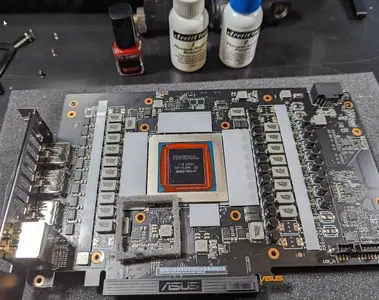
So the next big experiment for this build is to try out liquid metal (as opposed to regular thermal paste). After watching a lot of videos (and also noting in the Optimus docs for this block they also mention liquid metal being the best, here is where I got to...
1700878396119.webp

(notice the super clean pre-cut thermal pads provided by Optimus!!!) - Anyway, cleaned and polished the chip, spread some over-priced nail-polish (but hey, lets support these small manufactures) over the active components, and cut out a small little foam barrier just as a last line of defense in-case anythign goes sideways (literally and figuratively) with the liquid metal.

Here you can see my cheesy attempt to try and map out how much of the block will be touching the chip, meaning I need to also cover that with a bit of liquid metal. (placed a small drop of the "nail polish" on the foam, then put the block on so it would mirror on the other side)

1700878552469.webp
 
xentr_thread_starter
And voila!! (Hoping I haven't f'd anything up) I can't wait to see how well this works. And the Optimus block is rather unique (compared to a lot of the mainstream ones) - no RGB, but apparently a good reputation (I guess I will see) with regards to getting good temps. Other notes - easy to install, the whole assembly weighs a lot! but fortunately I have a vertically mounted GPU so that helps with the weight.

1700878706975.webp
 
xentr_thread_starter
Next steps are the CPU prep - also going down the road of using liquid metal (gonna de-lid it and replace the existing thermal paste). I realize that this is a huge risk as I don't have a test rig or easy way to test each component as I make these mods...Guess will have to see when I do the first power up...
 
xentr_thread_starter
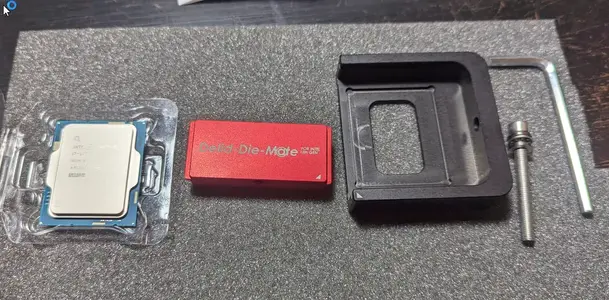
So just some updates / pics on the CPU delidding process - again, went down this route more from and interest point of view (I like trying new things), and technically, the I13 and I14 series CPUs have been getting a lot of flac related to high core temps. Noting I will still need to go into the bios to undervolt it, but for now, after watching a lot of videos, decided to give this a shot:

1702409497304.webp
The tool and contact frame (see upcoming) came from Thermal grizzly - well designed, tough, and easy to use.
Here's the lid off, and now the very difficult process of removing the existing thermal compound. As suggested in one of the videos, liquid metal actually binds well to this stuff to help clean it off.

1702409611581.webp
 
xentr_thread_starter
Here's the "after" shot, which has the liquid metal added, and I used a bit of gorilla glue to stick the IHS back on - technically its only rated to 100c, but that should be fine. Basically, just need it to hold the lid on long enough until I get it into the socket with the new holder.

1702409709591.webp

Now to take the waterblock off and remove the stock chip mount - I didn't realize it but Thermalgrizzly also includes a torx wrench to remove the stock mount...nice touch for those who may not have that tool.

1702409781332.webp

Off ya go!

1702409825014.webp
 
xentr_thread_starter
And bam, contact frame mounted very easy, and in theory, is supposed to provide a more even mount for the chip so that technically, the IHS does not warp slightly potentially reducing the contact area between it and the water block.

1702409919466.webp

Note - for anyone in the greater Vancouver area, I have a spare contact frame and the delidder tool (if you want to borrow it).

I did a quick post just to see if the CPU survived, and the MOBO detected it so phew...What I don't know yet is overall, if the heat dissipation is going to work correctly - as in between the liquid metal under the IHS, the paste on top and the block..hopefully all is good and will see once its all running.

I was tempted to also use liquid metal between the chip and the block, but I ran out so will see how it goes for now.
 
xentr_thread_starter
That's very interesting! Thanks for the pics of that. I've never been brave enough to go the delid route, so well done!
From the temperature gains that (some) people are reporting, in not bad - 5-10C. ButI would hold on to the congratulations until the rig is fired up and I get to see if I actually did it correctly :p

That being said, if it does work as its supposed to, that may help with the overheating issue that some peeps are reporting on these chips (again noting I will need to go in an undervolt the CPU a bit).

It was a lot of work trying to get the original paste off, and while I think I did it correctly (and got the liquid metal to properly connect with both the chip and the inside of the IHS), gonna have to wait and see with the final temps... Fingers crossed@!
 
Very nice work!

Is the gorilla glue you used for the IHS non-expanding and non-conductive? My only possible concern would be if that glue was "thick" and prevented a perfectly tight fit between the IHS and the liquid metal...or if it is conductive and causes any kind of electrical issue (many glues stick through dissolving some material).
 
Last edited:
xentr_thread_starter
Well shoot @Bond007 I didn't even think about that - doing a quick google search, it is listed as being non-conductive (or for the most cases, non conductive?). From the "expanding" perspective, before I used it I confirmed that with the IHS on the chip, there was still a gap between it and the PCB, so I could confirm that when I first applied it and held down the IHS, it should've made tight contact.

Ultimately though, I only used a small bit of the glue (just a dab in each corner) - you really only need it (well technically you don't need it) to help manage the process of getting the chip into the socket, and then the contact frame on. From there its the contact frame that actually holds the lid in place, and firmly presses down on all sides of the IHS so I think I should be safe there.

And while this is by no means based on anything scientific - I have been power up the rig for very short periods of time (just testing out the wiring), and every time I watch the CPU reported temperature. Considering that it always starts at 35C, then continues to rise (I turn it off by the time it hits 39) - I am not sure if that's a good sign, bad sign, or just not a sign at all, and that really, I need to wait until I can let it run and stabilize in the loop with the coolant going. I just need to be patient.
 

Latest posts

Back
Top