xentr_theme_editor

  • Please do not post any links until you have 3 posts as they will automatically be rejected to prevent SPAM. Many words are also blocked due to being used in SPAM Messages. Thanks!

How to block YouTube advertisements ??

Chess Gator

Well-known member
Joined
Aug 22, 2011
Messages
265
Reaction score
31
xentr_thread_starter
Hi fellows,

I am being drowned in YouTube advertisements! How do I kill these advertisements without paying YouTube money? Thank you
 
On PC or on Android?

On PC, I have to do the following:
  • Firefox private tab
  • Ublock Origin
  • Login all the time and when it shows the "Ad blocker violate agreement", close Firefox and open it again in private tab and log in again
On Android:
  • Revanced Youtube method
 
Edit: good point moocow - these are used on both the PC Win10 and Linux Mint with Firefox.

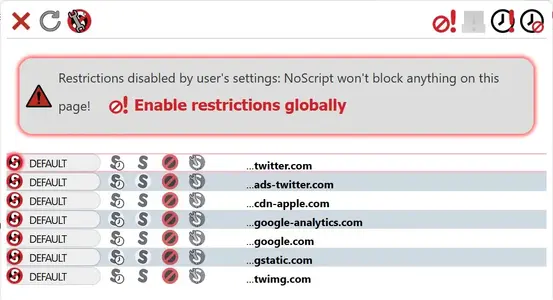
I don't get any, unless they are actually embedded in the video. Not all of these block ads, some of them block trackers that might support ad insertion because you're being tracked. NoScript can be tricky depending on the page/website. By itself it doesn't block ads directly that I know of - just the various scripts running that I don't want - i.e. I don't need scripts running for FB and other such sites. See the attached image - (forget what site that was from), I've blocked ads-twitter.com just by blocking the script from running. Many sites need specific scripts for the site to run properly. In some instances, I enable some scripts temporarily. On that site, I've blocked all of those scripts. However, for YouTube, I have to allow Google scripts to run, which does mean that Google tracks me on those sites.

Firefox with the following Add-ons:
Adblock Plus
DuckDuckGo Privacy Essentials
Ghostery Tracker & Ad Blocker
No Script (varies how you set it up for each page/website)
uBlock Origin
Privacy Badger

no-script-twitter.JPG
 
I'm running PFSense and it doesn't block ads on IPad. It also seems to ignore UBlock Origin being disable as the "ad violate user term" thingy still pops up.
 
UBlock Origin -> MyFilters:

Code:
youtube.com##.ytp-ce-element
youtube.com##.ytp-ce-covering-overlay
youtube.com##.ytp-ce-element-shadow
youtube.com##.ytp-ce-covering-image
youtube.com##.ytp-ce-expanding-image
youtube.com##.ytp-ce-element.ytp-ce-video.ytp-ce-element-show
youtube.com##.ytp-ce-element.ytp-ce-channel.ytp-ce-channel-this
 
xentr_thread_starter
Hi fellows,

I am using Google Chrome on a desktop. Is there anything for me to use? I do not use Firefox.

Thanks
 

Latest posts

Back
Top