xentr_theme_editor

  • Please do not post any links until you have 3 posts as they will automatically be rejected to prevent SPAM. Many words are also blocked due to being used in SPAM Messages. Thanks!

First TrueNAS build: Powers on but won’t POST (ASRock B550 Pro4)

QuestionAsker

Member
Joined
Jul 25, 2025
Messages
14
Reaction score
1
xentr_thread_starter
My new build powers on (fans spin, LEDs on) but no POST / no video output.


What I’ve tried / observed:

  • System powers on normally (fans, LEDs).
  • No signal on monitor (HDMI/DP).
  • No POST screen, no beeps.
  • Tried booting with Ryzen PRO 4750G, and then with Ryzen 5 3600 + GPU… still no POST screen or anything
Hardware:

  • Motherboard: ASRock B550 Pro4
  • CPU (primary): Ryzen PRO 4750G (used)
    • One pin was bent when removed (now removed from system)
  • CPU (test): Ryzen 5 3600 (used)
  • GPU (with 3600): Gigabyte Radeon R9 390X
  • RAM: 64 GB ECC UDIMM (2×32 GB Kingston KSM26ED8/32HC)
  • PSU: Corsair RM850x
Notes / hypotheses:

  • Suspect BIOS incompatibility with 4750G or damaged CPU pin.
  • Even with Ryzen 5 3600 + discrete GPU, still no POST.
Next steps I’m considering:

  • Test with a second (older) GPU
  • Attempt to straighten the bent CPU pin on the 4750G (though it’s my first time doing that and I’m a bit nervous… it looks pretty bent)
Question:

What else should I try to isolate the cause (BIOS, RAM compatibility, board issue, etc.)?
 
That board supports the 4750G and 3600 for all BIOS versions, so doubt that's an issue.

RAM is in slots 2 & 4?

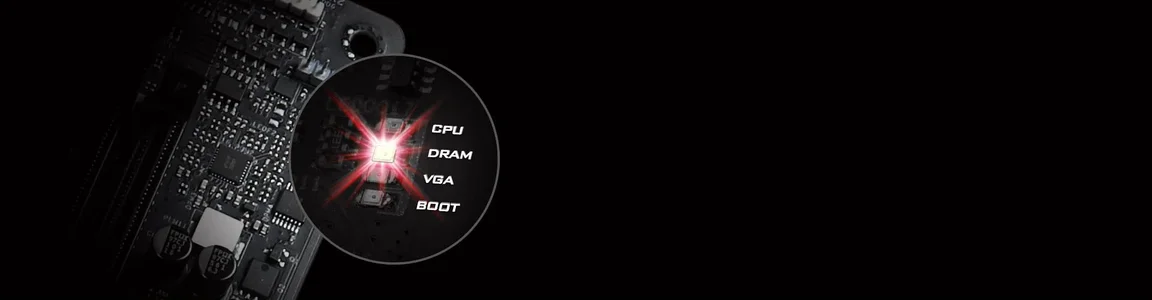
Does the POST LED on the board light up at all? Should help tell you what the issue is. Should be near the top right corner of the board.

1769313581535.webp
 
Do you have any other RAM?

I suspect it does not like the ECC one you have.

Try some regular non-ecc one, ddr4 3200 or lower, something generic, nothing fancy, the kind that you would never look at and will install in an office system for mom and dad.
 
xentr_thread_starter
Thanks @JD @Shadowarez and @djbrad

I want to buy a 8GB DDR4 stick to see if the ECC RAM might be the problem. Are there any particular brands / specific kits you'd recommend to maximize the chance of POST?

(I don't have any spare DDR4 laying around, or any DDR4 systems I could salvage from).

------------

Other updates:

Unplugged everything besides fans and mobo / cpu power. (And power/reset switch connections, since they're blocked by one of the HDDs, which I was hoping not to remove (since it was a pain to mount it)).


Still no POST. Just CPU and DRAM error lights.


Left only 1 x 32GB ECC RAM stick in the A2 slot. Still same errors, no POST.


Cleared CMOS (removed battery for 20+ min). No POST.


When booting, let it run a few times for 15 min + to see if maybe it needed to train the memory. Still no POST.


I will buy one stick of 8GB consumer DDR4 RAM, on ebay, to get it to boot. Problem is I have no DDR4 system, so I have no way of testing whether it's a "known good" stick or not.


(I'm open to suggestions for best DDR4 8GB stick to get, that has highest likelihood of getting my system to POST).


Please let me know if you guys have any other ideas.


(I also bought a motherboard speaker, for better troubleshooting. Waiting for it in the mail).
 
@QuestionAsker exactly what dj already stated, kind of whatever you can get for cheapest, even if it is just something used from a known good system (temporarily steal it from a friend etc)
...ddr4 3200 or lower, something generic, nothing fancy, the kind that you would never look at and will install in an office system for mom and dad.
 
Had this board, piece of sh*t board to be frank. It can run for days then on reboot would fail to post with DRAM LED on.

Personal advice, stay away from "budget" boards from ASRock (there is a reason it is nicknamed ASSRock).

NOTE: Taichi boards are awesome however, I have ASRock Taichi B550 - expensive board, but rock solid stable.

If you want to troubleshoot further, a lot of suggestions that were given were good.

I can only add the following:

1. Take out the board from the case to make sure there is no actual "short" of any sort with the case.
2. Place it on the anti-static bag on the motherboard box and try to POST from there.
3. Use Ryzen 3600 and non-ECC RAM in one of the memory slots - I recommend something that can post using JEDEC timings. Crucial (rest in peace), Corsair and Kingston usually the ones I recommend. GSkill is OK too, but not as reliable.

4. On the motherboard there will be a sticker with the BIOS version such as P1.6 (example) - that would be the BIOS version and you can check which CPUs exactly supported by that BIOS.

5. Good luck champ.

PS. Silly, but also check your PSU - if the CPU doesn't get proper power the whole system can fail to post too. Just a thought.
 
Another "silly" idea, PCIE power cables fit into the EPS12V (CPU) power too... so make sure it is the correctly labelled CPU cable that's plugged in there too. It should be a 4+4 cable.

Do you have any local computer shops you can take it to? They should have RAM on-hand to test with, extra CPUs, etc. Might be cheaper than buying things yourself to test.
 
xentr_thread_starter
Had this board, piece of sh*t board to be frank. It can run for days then on reboot would fail to post with DRAM LED on.

Personal advice, stay away from "budget" boards from ASRock (there is a reason it is nicknamed ASSRock).

NOTE: Taichi boards are awesome however, I have ASRock Taichi B550 - expensive board, but rock solid stable.

If you want to troubleshoot further, a lot of suggestions that were given were good.

I can only add the following:

1. Take out the board from the case to make sure there is no actual "short" of any sort with the case.
2. Place it on the anti-static bag on the motherboard box and try to POST from there.
3. Use Ryzen 3600 and non-ECC RAM in one of the memory slots - I recommend something that can post using JEDEC timings. Crucial (rest in peace), Corsair and Kingston usually the ones I recommend. GSkill is OK too, but not as reliable.

4. On the motherboard there will be a sticker with the BIOS version such as P1.6 (example) - that would be the BIOS version and you can check which CPUs exactly supported by that BIOS.

5. Good luck champ.

PS. Silly, but also check your PSU - if the CPU doesn't get proper power the whole system can fail to post too. Just a thought.

Thanks anabioz, I wasn't aware ASRock was such garbage. That's concerning. Hopefully if I can get this board to run, and not have issues with it.

Good steps to follow. Debating on buying some RAM, or just taking it to a local repair shop and paying the $75 for them to troubleshoot it.

Another "silly" idea, PCIE power cables fit into the EPS12V (CPU) power too... so make sure it is the correctly labelled CPU cable that's plugged in there too. It should be a 4+4 cable.

Do you have any local computer shops you can take it to? They should have RAM on-hand to test with, extra CPUs, etc. Might be cheaper than buying things yourself to test.

Thanks JD - I'm more open to just paying the $75 to the local shop... I think I might actually do that, as this computer has been on my bench for weeks now.
 
i actually have a truenas build i need to revisit took drives out of a old Qnap nas and rebuilt with wifes old system before she got a z690 12900k build.
 

Latest posts

Back
Top