
You are using an out of date browser. It may not display this or other websites correctly.
You should upgrade or use an alternative browser.
You should upgrade or use an alternative browser.
Corsair Obsidian 800D Owners Photo Gallery!
- Thread starter FiXT
- Start date

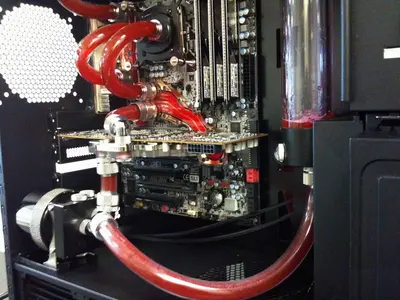


Quad rad in the bottom?! Nice stuff "thumb" I would add a little more to that res though.

- Location
- Grande Prairie, AB
I would add a little more to that res though.
Wow, most definitely. It is pretty much empty. What is the point of a 150ml reservoir if you only add 25ml to it.


Also just noticed to rear fan. Why so?

Also just noticed to rear fan. Why so?
I will be adding a fan there. :thumb:
I bet that is sounds like a fish tank now. LOL!!!
Strange place to put a quad rad....how does it get it airflow?
i have 4 fans on the back of that rad (pull configuration) :biggrin: and it is very quiet.
Just wanted to add a quick note that the Lian-Li bezels can be modded, along with your DVD drive, to work perfectly with the Obsidian. No glue, no messing around.Awesome thanks! So if I have this right:
1) You slid the DVD drive back into the case a bit and hot glued it in place.
2) You mounted the face plate using double sided tape?
On the face plate, the flange that I've circled in the attached photo is gone in your after pic. Did you bend the flange back flat so that it stuck into the case further?

If you look at the optical bays, with the face off of the Obsidian, you will notice that when you click the quick release into the locked position, a small plastic pin is pushed into the pre-fabbed screw holes on your DVD drive. Because optical drives are intended to sit flush with the face of the Obsidian, all that you need to do is drill another hole in the sheetmetal of the dvd drive, approximately 1/2" in front of the hole that is already drilled. I will list the steps that I took to modifying the Lian-Li bezel into my case:
First, remove the front panel of the Obsidian.
Remove the beauty cover that is covering the optical expansion slot that you wish to use - they slide out backwards: which is to say away from the front face.
notice that the lian-li bezel fits in perfectly to the hole previously occupied by the beauty cover, however there are two plastic wings which protrude. As previously diagrammed in this post, you must remove these wings.
To remove the plastic wings, all you need is a sharp exacto knife. Carefully notice where the beauty covers line up in the front panel of the Obsidian. You will want to trim the Lian-Li bezel at the same depth. I trimmed this at the point where the brushed aluminum meets the plastic of the Lian-Li bezel.
Now you can measure the drilled holes on the lian li, and drill a couple new holes in the retention side of the bezel, since you have just cut off the wings that would have otherwise secured the bezel to the case. the supplied screws that come with the lian-li bezel are what I used to hold the bezel in snug with the case. I did not drill into the front panel of the Obsidian - just the pinch friction of the screws is quite sufficient to hold the bezel securely in place.
With the windowed side panel of the Obsidian removed, you can now put the front panel back on the Obsidian. Now you will slide your optical drive forward in the case until it touches the front panel. This measurement is important, because you want the button of the Lian-Li bezel to touch the button of the optical drive. Make a mark on the optical drive with a sharpie, so that you know how much further forward on the optical drive to drill your retention hole.
Carefully line up your mark and using something with a sharp tip, make a little tap mark on the optical drive so that your drill bit doesnt wander. Slowly and carefully drill through the sheetmetal of the optical drive.
If you measured well, you can now install your optical drive into the Obsidian, and re-install the front panel.
Job Done! You have now installed the very sleek bezel, and kept your optical, tool-free installation!
If anyone has any questions or needs images, message me and I will be happy to help.
Garfunk

More pics of how you squeeze the psu and a quad WITH fans in the bottom of that thing.
I don't see how that is possible unless that rad is REALLY thin.
I don't see how that is possible unless that rad is REALLY thin.

xentr_legal_notice_title
xentr_legal_notice_description