
So a while ago, I decided that it would be nice to have a home server for a couple of reasons. I was running out of space for backups, and external drives just weren't really cutting it anymore. I wanted a computer I could leave on all the time and have some server applications running (a few games, and teamspeak server), and I wanted basically a media hub for all my photos, music, videos, and whatever else I have that takes up a lot of space.
So I set out to start figuring out what my needs where and making up a parts list I think will satisfy me, I setteled for the following.
Case: Fractal Design Node 804
CPU: Intel Core i3-4150
MoBo: Asus H97M-E
RAM: G.Skill Ripjaws X Series 8GB 1600 MHz (x2)
Boot Drive: Samsung 840 Evo 120GB
Storage: WD Red 3TB (x4)
Raid Controller: LSI MegaRAID 9266-8i
PSU: Corsair RM 450W
OS: Windows Server 2012 R2 Datacenter
The Node 804 surprised me in being one of the nicest cases I have ever worked in. Nearly every vent in the case has an easily removable and easily cleanable dust filter, except for the 2 rear exhaust vents which don't have a filter at all, but then again, they are exhausts, and since they are on the rear of the case its not likely dust would settle into them. Out of all the cases I have seen, this is one of the very few that does dust protection right. It was relatively spacious and easy to work in, and overall felt very solid. The only thing bad about it cable management in this case is a pain. There are only 4 or 5 cable tie notches, all along the bottom of the motherboard try in the path where the audio/usb headers are. There are none anywhere else in the case. I went out to the local Lowes and bought a bunch of cable tie bases with double stick tape and made my own tie down points in the rest of the case. Cutouts are slightly lacking too, I would have liked to see one under the mobo instead of just beside it. Also I really wish they would have made the top panel a little taller so that you could mount fans above the frame, or even hide cables up there.

I chose the core i3-4150 mainly for efficiency, it has a low TDP with more than enough performance than this thing will ever need, and its a relatively cheap part, which is great all around. This thing won't ever need to do any heavy lifting so it should be fine at this. Side note: my current desktop, which I built 5 years ago now, has a first gen i7-920 in it, and I am pretty sure that this i3-4150 is actually faster in most tasks. My 920 has a leg up during encoding tasks that fully utilize all the threads, but other than that, I think the i3 may have my old i7 beat.


The motherboard was honestly just one of the cheapest quality boards I could find. I didn't need that much in the way of a feature set, as long as it booted, had 1 sata 6 port, and 1 pci-e x4 or better slot, I was happy. There were a few other boards cheaper than this, but they were from lesser manufacturers that I was unsure of the quality on, or from gigabyte which I won't touch with a 10 foot pole after the last board I bought (the one in the previously mentioned 5-6 year old desktop I am using to type this).


The G.Skill ram was on sale, thats all there was too it. I was thinking about buying ECC ram and a MoBo that supported it, but decided that it wasn't worth the money since I never expect this thing to do any real heavy lifting of web services. Some small things like a minecraft and a teamspeak server, but not much more.


As far as the boot drive, I don't really expect it to have to be booting up often, but when I do I want it to be fast. I have had really good luck with Samsung SSD's so I went with them and their EVO line which I think is a great price/performance/longevity ratio.

I picked the WD Red drives at a pretty good bargain, and I wanted something that I knew would withstand potential constant use, performance is about as good as you can expect for 5400 rpm drives.

I knew that I wanted to run RAID 5 with this server for the redundancy, as it will be storing a lot of my photography, music, videos, backups of the other computers in the house, and so on. I was also doubted that on-board raid, especially on a budget board like this, could give me the performance I wanted. So I started looking at raid controllers. I was amazed at how expensive they are now, and ended up settling on this 9266-8i model. Nearly a $700 part if you buy one new. I picked mine up, used off ebay for around $250. This gives me the option to run 4 more drives in the future if I really want to, I don't know if I will ever take advantage of that, but its nice to know I have the option if I ever need even more space.

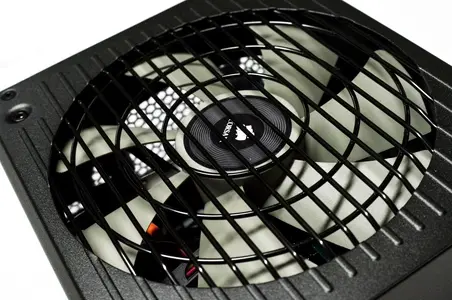
I chose the RM 450 as the power supply because, while it is expensive, it is extremely efficient. It is also extremely quite, the fan doesn't kick on until 40%ish load, and that happens almost never with this setup. To actually trigger the fan to turn on I would need to be running nearly every component at full boar.

Finally, I chose the OS, as I did want this to be a server. It will probably turn into a domain controller at the house and end up serving a few other tasks. Plus I had 2 copies of this OS laying around I picked up for free while I was in college. How could I not use a legally free version of a $6500 operating system?
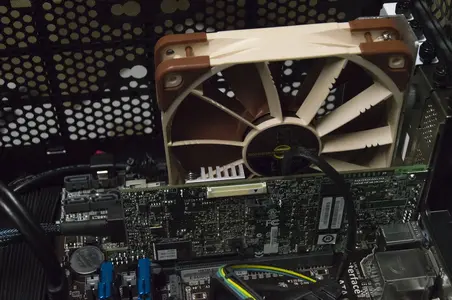
You probably noticed the very oddly placed Noctua fan, sitting near the middle of the case. I didn't originally plan to put this here, but it became a necessity, and I had to come up with a slightly interesting mounting mechanism for it.
After getting the server up and running, and waiting the 2 days it took for the raid 5 to initialize, I ran some benchmarks and some test file transfers and realized the raid card was not performing well. I was getting about 15-20MB/s transfer rates over a gigabit network. I knew something was up, and some of you may have seen my post in the storage forum about this, as the raid card is a very good card really, and should be getting darn good performance. That's when BlueByte pointed out to me something I should have realized already. This is a card meant for a rack-mount server, and a rack-mount server this is not. I don't have the tornado of air this thing was designed for. So I shut down the computer, pulled the power out, touched the case, then touched the heatsink on the card. I burned myself. I didn't even take a look at what temperature it was reporting, so I really have no idea what it was running at, but I knew that was my problem. So I designed a small bracket to mount a fan to an expansion slot cover so I could get air right on it. This has seemed to help tremendously. I have the Noctua NF F12 throttled to 1000rpm and at that rate the card seems to run around 50°C give or take a few degrees, and at that it doesn't seem to throttle performance.


Other than that, enjoy some random shots of stuff and cable management.

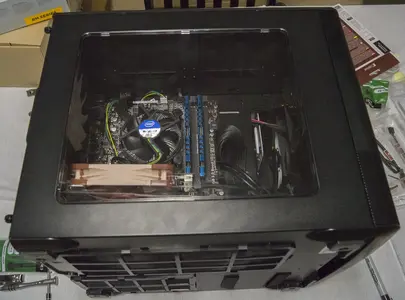
I apologize for some of the pictures being poor. I have a good camera, and do a good bit of photography, but most of the stuff I do is outdoors, and I haven't invested in any good indoor lighting yet. Some of these shots were taken while the build was in progress to so there is clutter in the background.
So I set out to start figuring out what my needs where and making up a parts list I think will satisfy me, I setteled for the following.
Case: Fractal Design Node 804
CPU: Intel Core i3-4150
MoBo: Asus H97M-E
RAM: G.Skill Ripjaws X Series 8GB 1600 MHz (x2)
Boot Drive: Samsung 840 Evo 120GB
Storage: WD Red 3TB (x4)
Raid Controller: LSI MegaRAID 9266-8i
PSU: Corsair RM 450W
OS: Windows Server 2012 R2 Datacenter
The Node 804 surprised me in being one of the nicest cases I have ever worked in. Nearly every vent in the case has an easily removable and easily cleanable dust filter, except for the 2 rear exhaust vents which don't have a filter at all, but then again, they are exhausts, and since they are on the rear of the case its not likely dust would settle into them. Out of all the cases I have seen, this is one of the very few that does dust protection right. It was relatively spacious and easy to work in, and overall felt very solid. The only thing bad about it cable management in this case is a pain. There are only 4 or 5 cable tie notches, all along the bottom of the motherboard try in the path where the audio/usb headers are. There are none anywhere else in the case. I went out to the local Lowes and bought a bunch of cable tie bases with double stick tape and made my own tie down points in the rest of the case. Cutouts are slightly lacking too, I would have liked to see one under the mobo instead of just beside it. Also I really wish they would have made the top panel a little taller so that you could mount fans above the frame, or even hide cables up there.
I chose the core i3-4150 mainly for efficiency, it has a low TDP with more than enough performance than this thing will ever need, and its a relatively cheap part, which is great all around. This thing won't ever need to do any heavy lifting so it should be fine at this. Side note: my current desktop, which I built 5 years ago now, has a first gen i7-920 in it, and I am pretty sure that this i3-4150 is actually faster in most tasks. My 920 has a leg up during encoding tasks that fully utilize all the threads, but other than that, I think the i3 may have my old i7 beat.
The motherboard was honestly just one of the cheapest quality boards I could find. I didn't need that much in the way of a feature set, as long as it booted, had 1 sata 6 port, and 1 pci-e x4 or better slot, I was happy. There were a few other boards cheaper than this, but they were from lesser manufacturers that I was unsure of the quality on, or from gigabyte which I won't touch with a 10 foot pole after the last board I bought (the one in the previously mentioned 5-6 year old desktop I am using to type this).
The G.Skill ram was on sale, thats all there was too it. I was thinking about buying ECC ram and a MoBo that supported it, but decided that it wasn't worth the money since I never expect this thing to do any real heavy lifting of web services. Some small things like a minecraft and a teamspeak server, but not much more.
As far as the boot drive, I don't really expect it to have to be booting up often, but when I do I want it to be fast. I have had really good luck with Samsung SSD's so I went with them and their EVO line which I think is a great price/performance/longevity ratio.
I picked the WD Red drives at a pretty good bargain, and I wanted something that I knew would withstand potential constant use, performance is about as good as you can expect for 5400 rpm drives.
I knew that I wanted to run RAID 5 with this server for the redundancy, as it will be storing a lot of my photography, music, videos, backups of the other computers in the house, and so on. I was also doubted that on-board raid, especially on a budget board like this, could give me the performance I wanted. So I started looking at raid controllers. I was amazed at how expensive they are now, and ended up settling on this 9266-8i model. Nearly a $700 part if you buy one new. I picked mine up, used off ebay for around $250. This gives me the option to run 4 more drives in the future if I really want to, I don't know if I will ever take advantage of that, but its nice to know I have the option if I ever need even more space.
I chose the RM 450 as the power supply because, while it is expensive, it is extremely efficient. It is also extremely quite, the fan doesn't kick on until 40%ish load, and that happens almost never with this setup. To actually trigger the fan to turn on I would need to be running nearly every component at full boar.
Finally, I chose the OS, as I did want this to be a server. It will probably turn into a domain controller at the house and end up serving a few other tasks. Plus I had 2 copies of this OS laying around I picked up for free while I was in college. How could I not use a legally free version of a $6500 operating system?
You probably noticed the very oddly placed Noctua fan, sitting near the middle of the case. I didn't originally plan to put this here, but it became a necessity, and I had to come up with a slightly interesting mounting mechanism for it.
After getting the server up and running, and waiting the 2 days it took for the raid 5 to initialize, I ran some benchmarks and some test file transfers and realized the raid card was not performing well. I was getting about 15-20MB/s transfer rates over a gigabit network. I knew something was up, and some of you may have seen my post in the storage forum about this, as the raid card is a very good card really, and should be getting darn good performance. That's when BlueByte pointed out to me something I should have realized already. This is a card meant for a rack-mount server, and a rack-mount server this is not. I don't have the tornado of air this thing was designed for. So I shut down the computer, pulled the power out, touched the case, then touched the heatsink on the card. I burned myself. I didn't even take a look at what temperature it was reporting, so I really have no idea what it was running at, but I knew that was my problem. So I designed a small bracket to mount a fan to an expansion slot cover so I could get air right on it. This has seemed to help tremendously. I have the Noctua NF F12 throttled to 1000rpm and at that rate the card seems to run around 50°C give or take a few degrees, and at that it doesn't seem to throttle performance.
Other than that, enjoy some random shots of stuff and cable management.
I apologize for some of the pictures being poor. I have a good camera, and do a good bit of photography, but most of the stuff I do is outdoors, and I haven't invested in any good indoor lighting yet. Some of these shots were taken while the build was in progress to so there is clutter in the background.
Last edited:


