xentr_theme_editor

  • Please do not post any links until you have 3 posts as they will automatically be rejected to prevent SPAM. Many words are also blocked due to being used in SPAM Messages. Thanks!

Intel Whitebook laptops?

xentr_thread_starter
Early observations:

Firmware is indeed the most recent which has the option in bios to limit charging capacity. There's also undervolting options in the bios so I can play with that to see what it takes to keep the temps down.

The ebay reseller set it up with a local account rather than a standard initial windows setup, but assured me over email that windows update picks up everything and that the only package I'd need for a fresh windows install is the intel control software for RGB, fan/performance profiles, etc.... and he was kind enough to throw a copy of that file onto the desktop for my safe keeping.

This magnesium alloy is a bit wierd..... it doesn't feel like an aluminum case. Aluminum would be a lot thicker.... the case walls on this seem thin without affecting the case strength.

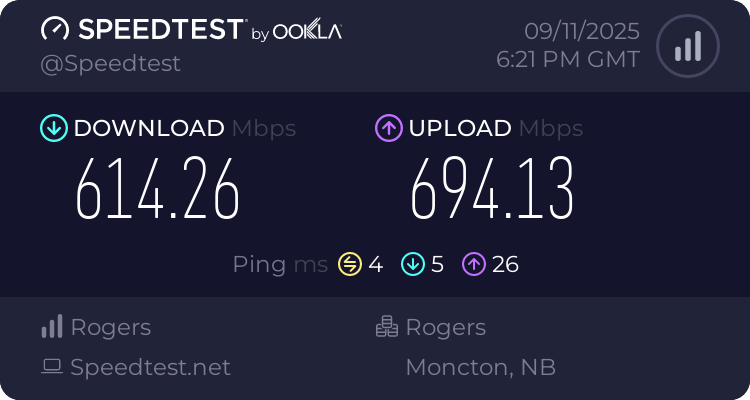
Wireless card is an AX200 and I'm getting 600+ up and down so I've got no complaints....


And.... yes it is a proper windows hello capable camera. First one I've ever had, and it's kinda neat! :)

 
xentr_thread_starter
The 2070 mobile frequncies look off to me for some reason.

There's undervolt options in the bios, could be there's some tweaking that can be done to prevent any kind of throttling. (Not sure that's happening though... temps look pretty low).

Just a couple of metrics from 3DMark, but the scores are in the ballpark for similar hardware, although a little low.

I managed to track down the realtek drivers and they came with the sound blaster cinema 5 software.


edit: That's more like it..... average freq is 1,542 MHz vice 1,246 MHz on the first test.


1757645054096.webp


edit 2: Another comparison with the 3050 (Steel Nomad Light ) 40% improvement with the 2070 over the 3050.

 
Last edited:
xentr_thread_starter
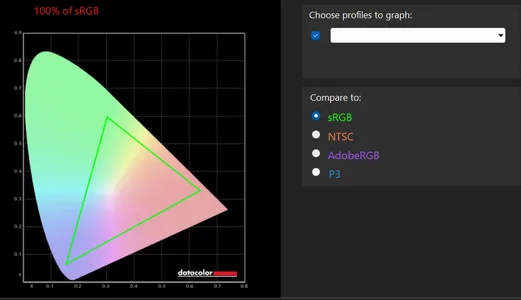
SRGB Default.webp

Reports as 100% SRGB at default and then 98% once it's calibrated.


There's a clear difference between the power profiles (selectable via button), but only somewhere around 15% between the performance and balanced settings. (I suspect I had the balanced settings selected for the first batch of tests which appeared a bit off).
 
a 15%-20% jump in FPS would be quite noticeable in some games. The newer runs are closer to what I had expected when I looked up the mobile specs.
 
xentr_thread_starter

These ship with a default undervolt of -50, and it does appear to make a difference.


Those are the runs @ -50, -100, and -125 (-150 was apparently a bridge too far that froze up during the 3DMark system specs collection).

I'll probably default back to the -100.

There are two more undervolt selections that I believe are probably related to IGP and dedicated graphics so I'll be playing with those to see what we get. (GT and GTU with no indication if they're both related to the iGPU or if one is for the dGPU).

I will say..... the processor on this (5 years old) is a bit pokey when compared to what I've been used to recently. Roughly equivalent to a desktop R5 3600, and I believe it's also close to the AMD 4800H I had in my 1050 laptop.
 
Last edited:
xentr_thread_starter

Comparison between default (-50 undervolt) and -125 undervolt +69Mhz boost to GPU freq from the Nvidia App tuning function.

Not a huge difference, but enough to leave it enabled. (2.8% gpu, 6.7% CPU)

I tried both the GT and the GTU undervolts without seeing any improvement, I suspect they're on the iGPU.
 
xentr_thread_starter

Pretty much on par with the PCMark score(s) I got with my Dell rtx 3050 laptop, but for different reasons. 40% better gaming scores on this one, but the 5600H processor + associated hardware on the dell was miles ahead of this 5 year old platform.
 
xentr_thread_starter
Summary:

Overall, happy with the purchase. In the current market it was still at least $100 cheaper than a similarly spec'd 3050 laptop with significantly better gaming benchmarks, and a pretty decent display (144hz, 100% sRGB). I chose this whitebook over a 3050 mainly because of the 8GB Vram.

The processor is weak when compared to modern mobile cpus, but having an undervolt option in the bios seems to help a bit. Having the memory limited to 2666 probably doesn't help either.

3DMark benchmarks are significantly better than average, and report back playable FPS @ 1440p on their (limited) slate of comparison games.

Physically.... this is a relatively thin and light laptop especially considering it's a gaming laptop (albeit an old platform). RGB keyboard lights as well as the front RGB strip can't be configured through bios and require the intel control center software to function.

So far the only complaints I have are the lack of wake-on-usb options in the bios (have to press the power button to wake from sleep), and I've had issues getting a second m.2 SSD recognized (system hangs on post, can't access bios), but it's possible that's an issue with the cheaparse drive that was used as a truenas OS drive (it's not the socket, I was able to move the OS drive over to the second slot and it works fine).

Being an older platform, probably worth mentioning that it's a 3X4 NVMe slot.
 
Back
Top