xentr_theme_editor

  • Please do not post any links until you have 3 posts as they will automatically be rejected to prevent SPAM. Many words are also blocked due to being used in SPAM Messages. Thanks!

Whats your latest purchase?

Most of these internet modems have an sfp+ to rj45 adpater internal. At least mine does. It should be simple enough to use a dac or with the unfi fiber use the rj45 directly for a 10gb connection. But to use an sfp+ to rj45 back to an sfp+ doesnt make a lot of sense.

I could use the rj45 port on the gateway to the switch

I'm wondering if I borked setting up the vlan's. If memory serves, I believe I noticed a drop in performance after I set them up when I still had the Max...
 
Last edited:
Phantom (aka tuxmat) custom fit mats for the new cx-5.

I have never bought anything other than cheap rubber car mats before, but with getting a new car I figured I would do this "right" before winter. EXTREMELY impressed with the quality and fit of these. They look amazing and cover almost all carpet (high sides and over the tunnel bump in the back seat, so no mud/water/winter salt should make its way to the actual carpet.

Tuxmat seems to be the best rated car mats there are (from my research). Canadian company, but made in China. Phantom is Tuxmat, but rebadged for Costco (and a bit cheaper). 100% confirmed as the box/instructions/shipping label/contact info/etc is all tuxmat, and I compared design and materials with a neighbour's tuxmat branded mats.

For my car they seemed to be $279-300 on the company site/amazon (tuxmat), but $240 through costco (phantom). They appear to be well worth it based on initial impressions. Long term (hopefully) purchase.
Tux mat is awesome
 
@Bond007 what about Weathertech?

Well reviewed, and most people that have them seem to really like them. I don't think you would regret it if you got them.

But the tuxmat have more coverage...higher up the the sides/back - wraps around front seat rails and tucks under the side vehicle trim, and the backseat mat literally goes up and tucks under the seat, etc) and people that have had both claim that tuxmat has a much better feel (cushion vs rigid).

I decided to "do it right" as I will probably have this car for a decade.

EDIT: and if it matters much to you, USA vs Canadian company
I've got weathertechs in my accura and they're okay. Better than factory rubber mats, but the black weathertech does seem to stain from road gravel a bit, and it doesn't come out with pressure washing as well as I'd like.

I'm sure a really strong PW and a plastic treatment would get them back to black, but was surprised that some of Edmonton's 'winter brown' did manage to settle into them.
 
have 12yo weather tecs in the truck. They are definitely not as nice black as they used to be but I don't do much else besides a little soap and pressure washer. Things like back to black and such probably work well on them but a lot of that stuff can make them slippery if applied to heavily so never bothered.
 
@Cypher^64 I suggest setting up something like iperf3 server and client locally will help debug some of that being able to test between machines on the local network

Going to do that this evening, but both pc's connect directly to the same switch, it'll help rule things out. Need to put a speed test app on one of the nas as all 3 connect directly to the new switch.
 
In the process of ordering a .5m DAC cable for the gateway to the switch and a 20m

I just did a large file tranfer from my plex box to the nas. It has a 2.5g card, goes to the flex 2.5g 8 switch over to the hd 24 switch. it was getting 260MB/s... that's almost full bandwidth...

1758560340379.webp


It's so odd. So I used the speedtest app and get 1350Mbps, turn IDS off and get 1590Mbps... the Fiber is supposed to do 5Gbps with it on, why would it speed up with it turned off on a slower connection than what they claim it supports...
 
Last edited:
Might have found it...

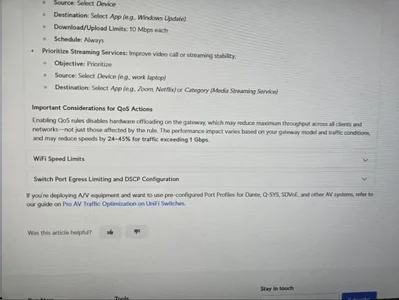
Apparently enabling QOS kills performance 24-45% for traffic exceeding 1Gbps...

I had to create a rule for the renters vlan (he's wifi only) to limit it to 500/50 cause if you want to set speed limit in the Ap's, it's 100 Mbps max.

I created a QOS rule for that and to prioritize the new Nest doorbell cam. It's says enabling QOS disables hardware offloading...

UniFi QoS and Traffic Shaping – Ubiquiti Help Center

1758563178050.webp

So... I disable QOS... and bandwidth now goes to almost 1700.... wow.. it never gave me any warning when I set that up...
 
Last edited:
Might have found it...

Apparently enabling QOS kills performance 24-45% for traffic exceeding 1Gbps...

I had to create a rule for the renters vlan (he's wifi only) to limit it to 500/50 cause if you want to set speed limit in the Ap's, it's 100 Mbps max.

I created a QOS rule for that and to prioritize the new Nest doorbell cam. It's says enabling QOS disables hardware offloading...

UniFi QoS and Traffic Shaping – Ubiquiti Help Center

View attachment 44994

So... I disable QOS... and bandwidth now goes to almost 1700.... wow.. it never gave me any warning when I set that up...

I don't use QoS in Ubiquiti as I've never found it to be necessary in a world with 1Gbps speeds. (VLAN config along with firewall rules and speed limitations do what I need.) But it sounds to me like Ubiquiti is handling 'QoS' by hard reserving bandwidth for QoS labeled applications? Which would be an odd way to go about it.
 
Back
Top