xentr_theme_editor

  • Please do not post any links until you have 3 posts as they will automatically be rejected to prevent SPAM. Many words are also blocked due to being used in SPAM Messages. Thanks!

Completed DIY Networked Attached Storage

Finally got shares figured out.... Windows disables SMB by default these days??????
SMBv1 has huge security vulnerability they never patched. Just replaced with v2/v3 or whatever they are up to.

It is actually recommended to not enable v1 and force everything to newer versions.
 
  • Like
Reactions: JD
xentr_thread_starter
I wasn't getting through to my unraid share without it enabled.... I'll dig deeper, but enabling it fixed the share issue immediately.
 
xentr_thread_starter
View attachment 43387

Finally got shares figured out.... Windows disables SMB by default these days??????

Not blisteringly fast but I guess parity effectively cuts your overall bandwidth in half? That's also being read from a mechanical drive on my main PC, not sure how much difference grabbing a big folder from the NVMe would make.

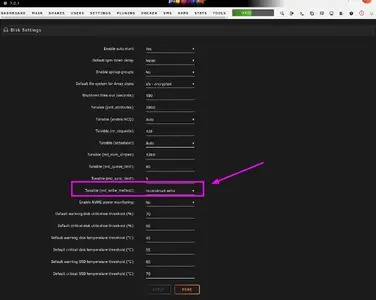
Selecting "reconstructive write" seems to have upped the speed a fair bit.
 
xentr_thread_starter
Only SMB1 should be disabled by default as it's a huge vulnerability for ransomware attacks.
SMBv1 has huge security vulnerability they never patched. Just replaced with v2/v3 or whatever they are up to.

It is actually recommended to not enable v1 and force everything to newer versions.

Ok, I think I've got it working now. I was able to go back and remove smbv1 as a feature yet still have access with credentials set in windows accounts (I really didn't want to have to use my windows account username as the share access user). Not sure what the issue was before other than maybe windows needed to be rebooted in order to see the newly created share on the network?
 
xentr_thread_starter
1743263819778.png

That's a bit more like it. Not huge files for transfer but quite a few large(ish) ones (amazon music folder).

Temps seem to be under control at the medium fan settings. I'm assuming mid 30s is not terrible for a nas drive.
 
xentr_thread_starter
Since this is no longer a build log it's switched over to "completed"

Hardware that went into the build.....

  • 3X 10TB Ironwolf Pro
  • 1X 10TB Ironwolf
  • 2X 8TB WD EZAZ
  • 2X 1TB WD SN850 NVMe (Mirrored Cache)
  • Topton 1X10G, 2Xi226-V, Intel i3 N305, 6XSata 3.0 Motherboard
  • 32GB Crucial DDR5 4800
  • Seasonic Focus GX-550
  • Fractal Node 304 case
  • Cheesy 6 drive sata cable bundle.

Used drives were sourced from a member for under $600, motherboard and memory was $400 from AliExpress, case was $165 (PSU was something I had on hand but I'm pretty sure I paid somewhere around $70 for it) so the total came out to $1200+, but it's also going to be close to $160 for the unraid license so probably a round figure of about $1400. (And I didn't include the new 22TB drive I paid $540 for but didn't use on this build).
 
xentr_thread_starter
Rest of this is just going to be comments on getting unraid configured, so please feel free to look away. :)

Added the two remaining unassigned drives to the array. As expected they've gone into pre-clear mode which is going to take 12(ish) hours before they're synced with the parity drive, but unlike the initial parity the existing array is available for use if I want. (I probably will just let it do it's thing and look back at it in the AM).
 
@sswilson :

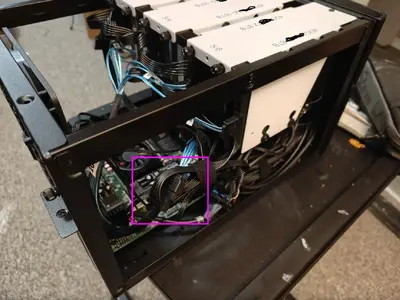
Please do NOT use cheap expanders for SATA power (I hope I am wrong).:

1743272006978.webp


Reasoning:

Start-up and load for an HDD is ~ 22W, I do NOT advise to connect more than 4 drives per power cable from PSU. That should cover ~ 100W.

1. If you overload SATA power connectors, they can start to melt.
2. If you overload SATA power connectors - drives will "fall-off" the raid under load.
 
Back
Top