

- Location
- Moncton NB
Kind of a weird config this time around for the backglass + DMD (points display) so I figured I'd document the numbers that worked for me.......
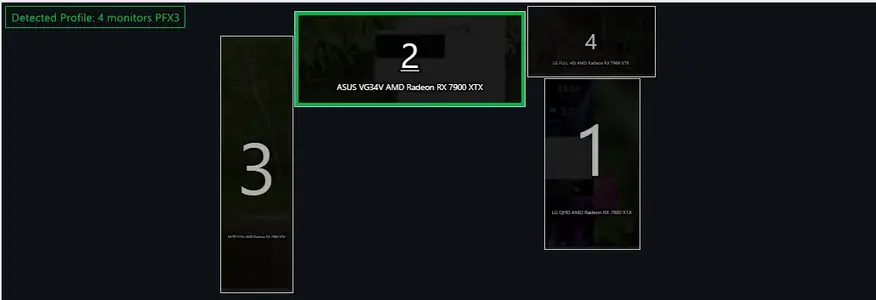
That's the setup I've got for the monitors with 2 being my main screen, 3 being my vertical hyte display, 1 being the pinball playfield (flipped portrait 1440 X 2560) and 4 is the backglass + DMD (1920X2080), and as an aside.... I see now that I've laid it out with the #4 slightly above the top edge of #2 which explains why I had to use wonky screen size numbers for that display.
So.... basically it's set up with the playing field window opening up on my main screen (#2) and then moving it over to #1, thus the backscreen + DMD numbers are based off of #4's relation to monitor #2 (not #1 where the playfield ends up).
Here's the numbers I used which seemed to work out well......
Getting the backglass set up has always been a bit of a pain with FX3, especially if you're dealing with multiple monitor setups. My last config was designed around having just monitors 4 & 1 active, but for some reason that was a bit wonky in having to set #1 to landscape and then rotating the playscreen in FX3's settings. That then introduced a whole different set of challenges getting the backglass/dmd lined up on #4.
This config seems to be a bit easier to set up. (not counting the slight issue with my monitor positioning throwing off the backglass resolution... ).
).
That's the setup I've got for the monitors with 2 being my main screen, 3 being my vertical hyte display, 1 being the pinball playfield (flipped portrait 1440 X 2560) and 4 is the backglass + DMD (1920X2080), and as an aside.... I see now that I've laid it out with the #4 slightly above the top edge of #2 which explains why I had to use wonky screen size numbers for that display.
So.... basically it's set up with the playing field window opening up on my main screen (#2) and then moving it over to #1, thus the backscreen + DMD numbers are based off of #4's relation to monitor #2 (not #1 where the playfield ends up).
Here's the numbers I used which seemed to work out well......
Pinball FX3 backglass settings
Dot Matrix Horizontal position - 4060
Dot matrix vertical position - 750
Dot matrix Horizontal Size - 700
Dot Matrix vertical size - 200
Backglass horizonatal position - 3440
Backglass vertical Position - -100
Backglass horizontal size - 1920
Backglass vertical size - 1100
Getting the backglass set up has always been a bit of a pain with FX3, especially if you're dealing with multiple monitor setups. My last config was designed around having just monitors 4 & 1 active, but for some reason that was a bit wonky in having to set #1 to landscape and then rotating the playscreen in FX3's settings. That then introduced a whole different set of challenges getting the backglass/dmd lined up on #4.
This config seems to be a bit easier to set up. (not counting the slight issue with my monitor positioning throwing off the backglass resolution...
).


