
Got my hands on Lenovo M75s Gen 2 Desktop with Ryzen 3 4350G.
I was not happy with the cooling and the CPU, so I took it apart and did some upgrades. This post is intended to share some ideas on how SFF can be upgraded to have better cooling. Temperatures under 100% load were reaching 90C with a stock cooler.
1. Replaced the 4350G with 4750G and installed Crucial Pro DDR4-3200 64GB (2x32GB) Kit.
2. Got the replacement cooler: https://www.newegg.com/raijintek-0r100004/p/13C-001T-00011
3. Got Metal Drill Bits: https://www.amazon.ca/dp/B07B4LCWC4
4. Sandpaper: https://www.amazon.ca/dp/B08TBW22FL
5. Fan dust filters: https://www.amazon.ca/dp/B0BMXLGLNX
--
Let the upgrade begin:
Used the Intel mounting bracket with screws from Thermalright's PA intel kit.

Then installed the actual cooler:
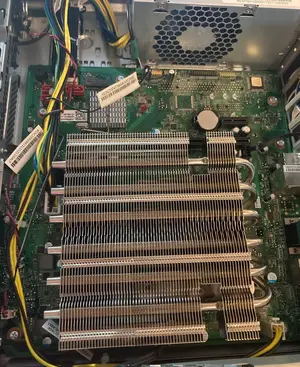

To improve airflow of the case, I needed to drill some holes in the side panel (don't judge me on this one)

And installed a small rear fan for exhaust:

The temperatures dropped by ~ 30C under full load (from ~90C to 58C) and idle is around 33C. Well worth it.
I was not happy with the cooling and the CPU, so I took it apart and did some upgrades. This post is intended to share some ideas on how SFF can be upgraded to have better cooling. Temperatures under 100% load were reaching 90C with a stock cooler.
1. Replaced the 4350G with 4750G and installed Crucial Pro DDR4-3200 64GB (2x32GB) Kit.
2. Got the replacement cooler: https://www.newegg.com/raijintek-0r100004/p/13C-001T-00011
3. Got Metal Drill Bits: https://www.amazon.ca/dp/B07B4LCWC4
4. Sandpaper: https://www.amazon.ca/dp/B08TBW22FL
5. Fan dust filters: https://www.amazon.ca/dp/B0BMXLGLNX
--
Let the upgrade begin:
Used the Intel mounting bracket with screws from Thermalright's PA intel kit.
Then installed the actual cooler:
To improve airflow of the case, I needed to drill some holes in the side panel (don't judge me on this one)
And installed a small rear fan for exhaust:
The temperatures dropped by ~ 30C under full load (from ~90C to 58C) and idle is around 33C. Well worth it.


 Just goes to show how bad the original really was.....


