xentr_theme_editor

  • Please do not post any links until you have 3 posts as they will automatically be rejected to prevent SPAM. Many words are also blocked due to being used in SPAM Messages. Thanks!

Whattya Running for Linux?

This has been a pretty terrible experience so far.

Try Zorin OS. First boot good. 2nd boot no longer have a GUI. Think it can't find a display adapter. Seems like a common enough issue.

Doing install of Ubuntu again, to get my mouse working.

EDIT: I'm done. As much as I dislike Windows at least my damn mouse works.
 
Last edited:
Sigh, still trying. Was suggested to try Garuda Linux.

Not sure why the live installer needs 25GB. Yet somehow only getting 1/5th FPS. And the install failed.
1000004719.webp
 
Last update for me. I tried CachyOS and man was I impressed. The windows management of KDE Plasma is next level. It was so intuitive. Windows snapped together. Resizing windows that are snapped, and it will snap to the same width/height. Shift + drag and you can snap in to zones.

Windows management in windows 11 is just garbage in comparison.

However, I have the same problem. I simply can't use 2 buttons on my mouse. I was able to install libratbag finally without issue. But my device isn't supported. So I'm SOL unless I buy a new mouse, which I will not do as its the only mouse style I'll use.
 
I don't suppose you know if jellyfin under kodi has a decent navigation experience using a USB remote?

I'd really like to get away from using the android jellyfin app, but am not willing to give up the easy remote navigation.
I don't, but from the readme of the addon it just add your jellyfin media into kodi's database, so it should be the same.
 
I had decided to try another mouse, an ROG Gladius 2. I've also had set the DPI buttons to PG UP / DN. And it had the exact same issue. The buttons simply don't do anything.

The ROG mouse did show up in Piper, but it only listed one of the buttons.

Also I noticed that the Naos Pro (first mouse) showed the 'keyboard' under mouse settings. Which I think is the issue. The bound keyboard buttons should show as a keyboard, like it does in Windows.
 
So I decided to try the last mouse I have. A DM2 Comfy S. And the buttons actually work!

I don't understand how some small no name company has working buttons in Linux when Asus or Mionix couldn't.

I had mostly given up. And I've since resized my partitions, so my Documents, etc won't fit on Linux partition. But maybe I'll try using this for a few weeks to see how it goes.
 
  • Like
Reactions: 10e
So I decided to try the last mouse I have. A DM2 Comfy S. And the buttons actually work!

I don't understand how some small no name company has working buttons in Linux when Asus or Mionix couldn't.

I had mostly given up. And I've since resized my partitions, so my Documents, etc won't fit on Linux partition. But maybe I'll try using this for a few weeks to see how it goes.

That's bizarre. I would have assumed that mouse buttons (at least the L/R, forward/back, and scroll wheel clicker) would be universally recognized, and that beyond those 5 the buttons would be automatically mapped as something like mouse button 6 - 10.
 
That's bizarre. I would have assumed that mouse buttons (at least the L/R, forward/back, and scroll wheel clicker) would be universally recognized, and that beyond those 5 the buttons would be automatically mapped as something like mouse button 6 - 10.
I have the DPI buttons mapped to Page Up / Down. It doesn't require software to run or drivers to be installed after initial setup. But for some reason with both mouses, they do absolutely nothing in Linux. And they can only be programmed as DPI buttons or keyboard buttons.
 
Think I'm done w/ linux, again lol. Everything I try to do I'm met with so much resistance. The only app I could find that allows me to send commands to Home Assistant is a choir to use. And then I find out it requires X11 to capture keyboard commands. Install Plasma X11 and its terrible.

Without easy access to Home Assistant, I lose too much functionality of my desktop.
 
1771882681184.webp

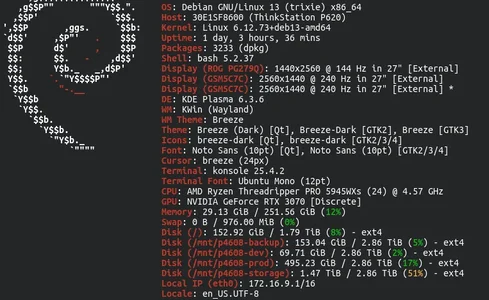
Pure Debian 13.

Standard suite of software:

# Desktop
KDE for DE

# CLI
Konsole

# Web
Brave
Firefox
Microsoft Edge

# Chat
Signal
Telegram
Discord

# Text/Code
Sublime Text
PyCharm
VS Code

# RDP
FreeRDP3

# Containers/VM
Docker
VMWare Workstation
 

Latest posts

Back
Top