xentr_theme_editor

  • Please do not post any links until you have 3 posts as they will automatically be rejected to prevent SPAM. Many words are also blocked due to being used in SPAM Messages. Thanks!

VLANs discussion

lowfat

Moderator
Staff member
Joined
Feb 12, 2007
Messages
14,368
Reaction score
3,287
xentr_thread_starter
Anyone here using them?

So finally got VLANs working. Tried like 10 years ago and gave up. Had a whole lot of trouble getting OPNSense, Netgear switch, and Ubiquiti switch to play nice.

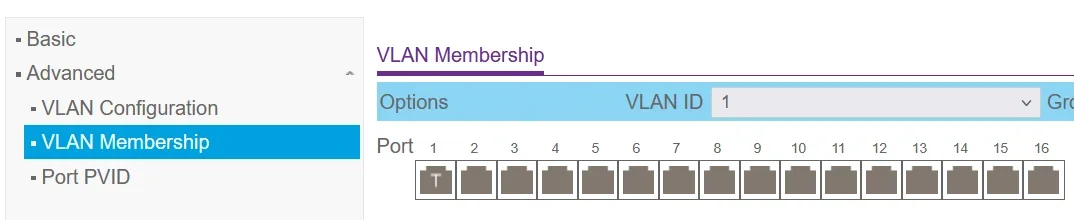
I originally setup 1 VLAN for IOT, VLAN20. And eventually got it working. But OPNSense suggests that all traffic on the uplink should be tagged. But if I tag the uplink, I lose access to the gateway. Found a post somewhere stating I'd need to create a new VLAN in OPNSense, and reassign the LAN interface to use it. Did that. Configured switch to move PVID for most ports to the new VLAN. All working except the AP. Sigh.

I changed the PVID for the AP to VLAN10 and untagged it. AP is up. But wifi is down. Ended up having to change the default wifi network from VLAN10 to native network. This just doesn't make sense to me. So now VLAN1 (native) literally has no devices except the OPNSense gateway. That doesn't seem right but whatever, everything is working now.
1763516350810.webp

I guess now to figure out how to seperate the network properly. Move all my non local controlled IOT to to the proper VLAN and hope Home Assistant can still control it without issue.
 
Ive been using a VLAN for IOT for a couple of years now and just recently setup VLANS to start separating all my traffic. I can show you some examples of my OPNSense setup.

Also for tagging. The way I do it is any device thats downstream from the switch that cant understand VLAN tags. I set the port to the VLAN its on but it goes untagged. This way anything thats connected to that port is tagged on that VLAN.

So for example with my IOT setup it goes OPNSense (IOT network VLAN 50) --> Switch tagged VLAN 50 on port --> Ex. port 5 on the switch untagged but the port ID is VLAN 50.

This means my IOT device in port 5 any traffic that comes into the switch is on VLAN 50. So the traffic can pass back to OPNSense on that VLAN interface. Also almost all of my ports on my switch are tagged with all VLANS so all traffic can come and go unless there is a downstream device that cant do VLANS on the port. I can post some screenshots that might make more sense if your still working on this.

This is what my interfaces look like right now. I have my OPNSense virtualised in proxmox right now.

1764171488086.webp
 
Ive been using a VLAN for IOT for a couple of years now and just recently setup VLANS to start separating all my traffic. I can show you some examples of my OPNSense setup.

Also for tagging. The way I do it is any device thats downstream from the switch that cant understand VLAN tags. I set the port to the VLAN its on but it goes untagged. This way anything thats connected to that port is tagged on that VLAN.

So for example with my IOT setup it goes OPNSense (IOT network VLAN 50) --> Switch tagged VLAN 50 on port --> Ex. port 5 on the switch untagged but the port ID is VLAN 50.

This means my IOT device in port 5 any traffic that comes into the switch is on VLAN 50. So the traffic can pass back to OPNSense on that VLAN interface. Also almost all of my ports on my switch are tagged with all VLANS so all traffic can come and go unless there is a downstream device that cant do VLANS on the port. I can post some screenshots that might make more sense if your still working on this.

This is what my interfaces look like right now. I have my OPNSense virtualised in proxmox right now.

View attachment 45524
how long did it take you to figure out and finally get everything to look like it's working properly?
 
how long did it take you to figure out and finally get everything to look like it's working properly?
Once I understood the concept better, and with a little help from some AI, probably about 2 weeks. Though this was part of a much larger migration away from a flat network. Now all I have to do it tag the vlan on whatever VM or device to put it on the network I want. The big key was making interface on opnsense so it can do the routing. Ideally in the future I would like to get a L3 switch so it can do the routing. This is because I'm wiring my house with Fiber so I can do 100Gbe+ networking in the future as I upgrade things. My omada switch can do some basic static routes (which I havent even tried yet) but it would be nice to have a full fat L3 switch.
 
xentr_thread_starter
Most of my VLAN issues seemed to be causes by Home Assistant. It is technically vlan capable. But it isn't supported. I had both normal an IOT VLANs but has all sort of issues. Couldn't delete VLANs on it either. So had to reformat and restore backup. I just moved it to the IOT VLAN entirely. Had no issues since.

Had a brief issue trying to figure out how to get Plex to work but ends up being a plex setting.

Will hopefully set up firewall rules this weekend to segregate traffic. I did set up 2 IOT networks. One where i can access the device locally and one for cloud only. Can block off the cloud one completely from my network.

TBH probably should have added one more that requires no access to internet as well.
 
Probably easiest to start small then make more later. Im still migrating things as it turns out if opnsense has an issue I was losing all my network access. So now I run core services on Vlan 1 so it always works then everything else in its own segregated VLAN.

Plex from what ive read has issues with vlans on local playback. I need to move that and see if I can make it work. My HA is a VM so I tag vlans using the proxmox interface. I havent had too many issues so far. Usually just firewall rules that need to be setup. But not always easy to diagnose.
 
Ive been using a VLAN for IOT for a couple of years now and just recently setup VLANS to start separating all my traffic. I can show you some examples of my OPNSense setup.

Also for tagging. The way I do it is any device thats downstream from the switch that cant understand VLAN tags. I set the port to the VLAN its on but it goes untagged. This way anything thats connected to that port is tagged on that VLAN.

So for example with my IOT setup it goes OPNSense (IOT network VLAN 50) --> Switch tagged VLAN 50 on port --> Ex. port 5 on the switch untagged but the port ID is VLAN 50.

This means my IOT device in port 5 any traffic that comes into the switch is on VLAN 50. So the traffic can pass back to OPNSense on that VLAN interface. Also almost all of my ports on my switch are tagged with all VLANS so all traffic can come and go unless there is a downstream device that cant do VLANS on the port. I can post some screenshots that might make more sense if your still working on this.

This is what my interfaces look like right now. I have my OPNSense virtualised in proxmox right now.

View attachment 45524
Makes running my smart plugs on my guest network look a little embarrassing :)
 
xentr_thread_starter
Locked everything down tighter than fort knox. Or at least I hope so lol. Took a bit to figure out how rules actually work in OPNSense. But I think I got it. I've deleted the 'pass all traffic' for all VLANs.


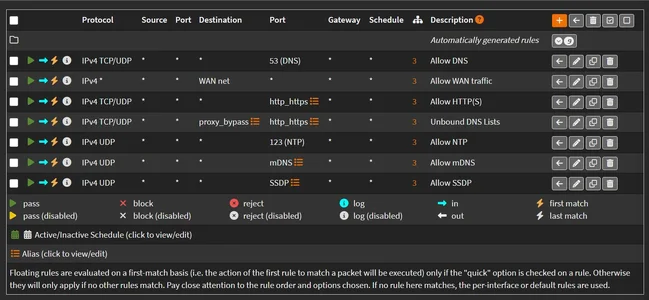
The floating rules apply to all VLANs. This is just basic stuff like passing DNS, HTTP(S), traffic to the WAN, etc
1764723975695.webp
For my IOT_CLOUD VLAN. Devices do not need any access to devices in my network. Google Homes, Nest, Tuya smart devices, etc. They have no access to rest of the network. I've also blocked off most access to most ports. I can see the Firewall logs blocking a lot of google home traffic. But AFAIK they are all working properly. TBH I probably could have done this all without VLANS as my rules are mostly done by device and not the whole VLAN.
1764724215245.webp


For IOT. This is for devices that are controlled in some part locally by Home Assistant, my phone, etc. So they do need limited access through firewall. But absolutely are locked down pretty tight. They can't access anything outside of the VLAN besides basic internet, and the devices that connect to them. I haven't checked if Plex actually works yet. But it should.
1764723581347.webp

And then the main VLAN, LAN. Technically everything here is trusted. At first I still wanted to lock everything down except for ports I needed. But I got sick of chasing ports, literally 99% of which were trying to get my damn Bambu printer accessible in the app on my phone. So my server, PC, and phone allow all TCP traffic.
 

Latest posts

Back
Top