
- Location
- Moncton NB
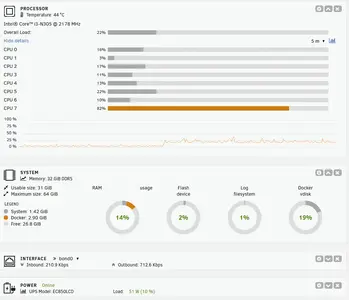
Going by this (14% ram usage) I strongly suspect I would have been fine with a 16GB memory stick instead of a 32GB one.


I wonder if you would have been just better off with distributed parity in general. The dedicated parity drive is a bottleneck of sorts and I suspect will potentially suffer from advanced wear as well. That parity drive is being worked harder than any other drive in the system.
Your power on hours will remain balanced but the IOPs will be heavily skewed.
 ) is that the performance penalty is the price you pay for using unraid's parity system which allows a single drive to provide backup for an infinite number of data drives. Beyond that you end up with some form of raid (striped or mirrored) which generally comes with a storage size penalty.
I would have suggested to just leave the larger drive as an unassigned drive. Just use the other drives in the array, no parity. Then do backups to the unassigned disk as necessary. This way the individual drives can spin down since you dont have to enable reconstruct write.I'm not sure if that's an option with unraid, unless it's a feature of a different file system? Going by the AI generated description of distributed parity it is "kinda" doing that as there is parity information stored on each data drive (191GB in the case of the 10T drives when empty). My understanding (basic as it is
edit: The biggest issue with using that huge parity disk (again.... mainly done to allow me to throw in a larger drive in the future) is that it effectively doubles my parity check time.

I'd seperate the cache drives. 1 for system. 1 for downloading, etc. I'd rather backup my dockers regularly than use a second ssd as mirrored cache.
I'd seperate the cache drives. 1 for system. 1 for downloading, etc. I'd rather backup my dockers regularly than use a second ssd as mirrored cache.

xentr_legal_notice_description


