xentr_theme_editor

  • Please do not post any links until you have 3 posts as they will automatically be rejected to prevent SPAM. Many words are also blocked due to being used in SPAM Messages. Thanks!

Completed DIY Networked Attached Storage

xentr_thread_starter
1744817590156.webp

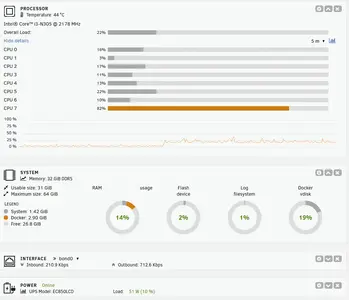
Going by this (14% ram usage) I strongly suspect I would have been fine with a 16GB memory stick instead of a 32GB one.
 
I wonder if you would have been just better off with distributed parity in general. The dedicated parity drive is a bottleneck of sorts and I suspect will potentially suffer from advanced wear as well. That parity drive is being worked harder than any other drive in the system.

Your power on hours will remain balanced but the IOPs will be heavily skewed.
 
xentr_thread_starter
I wonder if you would have been just better off with distributed parity in general. The dedicated parity drive is a bottleneck of sorts and I suspect will potentially suffer from advanced wear as well. That parity drive is being worked harder than any other drive in the system.

Your power on hours will remain balanced but the IOPs will be heavily skewed.

I'm not sure if that's an option with unraid, unless it's a feature of a different file system? Going by the AI generated description of distributed parity it is "kinda" doing that as there is parity information stored on each data drive (191GB in the case of the 10T drives when empty). My understanding (basic as it is :) ) is that the performance penalty is the price you pay for using unraid's parity system which allows a single drive to provide backup for an infinite number of data drives. Beyond that you end up with some form of raid (striped or mirrored) which generally comes with a storage size penalty.

edit: The biggest issue with using that huge parity disk (again.... mainly done to allow me to throw in a larger drive in the future) is that it effectively doubles my parity check time.
 
Last edited:
I'm not sure if that's an option with unraid, unless it's a feature of a different file system? Going by the AI generated description of distributed parity it is "kinda" doing that as there is parity information stored on each data drive (191GB in the case of the 10T drives when empty). My understanding (basic as it is :) ) is that the performance penalty is the price you pay for using unraid's parity system which allows a single drive to provide backup for an infinite number of data drives. Beyond that you end up with some form of raid (striped or mirrored) which generally comes with a storage size penalty.

edit: The biggest issue with using that huge parity disk (again.... mainly done to allow me to throw in a larger drive in the future) is that it effectively doubles my parity check time.
I would have suggested to just leave the larger drive as an unassigned drive. Just use the other drives in the array, no parity. Then do backups to the unassigned disk as necessary. This way the individual drives can spin down since you dont have to enable reconstruct write.

Alternately you could run the single large drive in the array and create a zfs pool with the other drives for performance. Then backup to the array when needed.
 
xentr_thread_starter
I may end up doing something along those lines now that I've got a better idea of what my storage requirements are. As it stands, I've got under 8TB data so there's lots of room to grow and I could conceivably use the 22TB drive as backup while striping the 4 10TB drives for speed.

Probably going to hold off a while on it though as everything seems to be working as advertised for now. :)
 
xentr_thread_starter
Didn't really do a summary on this build.....

  • 4X 10TB Ironwolf Pro
  • 1X 8TB WD EZAZ
  • 1X 20TB Ironwolf Pro
  • 1X 22TB Ironwolf Pro (Parity)
  • 2X 1TB WD SN850 NVMe (Mirrored Cache)
  • 2X TR HR-09 NVMe tower coolers
  • Topton 1X10G, 2Xi226-V, Intel i3 N305, 6XSata 3.0 Motherboard
  • 32GB Crucial DDR5 4800
  • Seasonic Focus GX-550
  • Fractal Node 304 case
  • 1X Noctua NF-A14 FLX, 2X Noctua NF-A9 FLX
  • Cheesy 6 drive sata cable bundle.
  • 10.1" QHD IPS monitor
  • Logitech K400 KB/touchpad
  • Cyberpower EC850LCD 850VA/510W UPS (1hr+ backup for a clean shutdown in case of power failure)

Total available storage ended up at 48TB 60TB. Currently sitting at less than 12TB with a significant amount of content padding so <25%. I managed to grab 4X used 10TB drives + a couple of 8TB drives for a decent price (one of the 8TB drives replaced a storage SN850X in my main rig freeing up the NVMe for use as the mirror drive). Paid the big bucks for a new 22TB drive that I'm using for Parity.

I'm not completely sure how much value there is to the mirrored NVMe cache drives in this configuration. The system still resides on a USB stick for booting so you're looking at the main benefit being having the docker image files + related app data being served off of the cache. In my current config, new downloads go to the cache drives and are then moved over to the mechanical drives overnight once the DL(s) is/are complete. Files are served from the mechanical drive rather than from the cache so there's no speed benefit to the cache when accessing library content.

The motherboard worked out well. Seems to have more than enough power even when being slammed with a ton of peers on the client. Normal power use seems to be somewhere between 50 - 60W with peaks as high as 73W in worst case load scenarios (cpu use 75% paired with lots of HDD access). That power profile gives me close to 1hr battery backup for a clean shutdown in case of power failure. Memory was overkill as I've never seen it hit over 25%, but that leaves me with a lot of overhead if I decide to add more docker containers.

Case was functional, but a bit difficult to work in. The internal power supply cable was less than ideal for the PSU I used (facing the wrong way). The replacement Noctua fans do seem to be a bit quieter at the medium fan speed setting, but I'm not sure they were necessary. The NVMe tower coolers did a fine job of bringing temps down to 35(ish) on those drives, and the mechanical drives seem to fluctuate between 32C and 36C.

Software side, I went with Unraid Unleashed (total 8 drives including the two cache ones) which gives me a 1 year OS upgrade window with the option to either pay an annual subscription when/if it comes time to upgrade after the initial year expires and/or bite the bullet and buy the lifetime upgrade. I initially started with the most recent version (7.XX) but decided to nuke that array before starting to populate it and went back to 6.xx as a lot of the guides used tools which weren't ported over to 7.xx. Once I got everything up and running under 6.xxx I had no problems upgrading to the newest version. Unraid was/is very noob friendly with easy docker container implementation. Only issue I ran into was the fast transfer option (reconstruct write) not being enabled by default which cuts throughput by close to half.

I won't go into all of the installed software, but I ended up with Deluge client (through PIA) along with Jellyfin to access content. Jellyfin seems to be doing everything I need, although we do find the "next up" feature needs a bit of work. I've also taken advantage of the basic (free) tailscale package which allows for 3 users to have remote access to the jellyfin server.
 
Last edited:
I'd seperate the cache drives. 1 for system. 1 for downloading, etc. I'd rather backup my dockers regularly than use a second ssd as mirrored cache.
 
xentr_thread_starter
I'd seperate the cache drives. 1 for system. 1 for downloading, etc. I'd rather backup my dockers regularly than use a second ssd as mirrored cache.

I've considered grabbing a 1TB ssd to use as the mirror and dropping one of those M.2 sata port thingies into the second NVMe slot.
 
Back
Top