xentr_theme_editor

  • Please do not post any links until you have 3 posts as they will automatically be rejected to prevent SPAM. Many words are also blocked due to being used in SPAM Messages. Thanks!

Completed DIY Networked Attached Storage

It won't look like that when I add a 20TB drive into the mix. :)

I am not sure what you were thinking, but if you will replace 10TB drives with 20TB ones - your partitions would still be 10TB as that is the array size. Or if you add 20TB new drives, then that could work but only for new drives.
 
xentr_thread_starter
I am not sure what you were thinking, but if you will replace 10TB drives with 20TB ones - your partitions would still be 10TB as that is the array size. Or if you add 20TB new drives, then that could work but only for new drives.

I was under the impression that you could replace a smaller drive with a larger one, but even if that isn't the case it'd be for a new drive/replacement (clear the old drive of data, remove from the array, add the new drive).

Either way.... I grabbed the 22TB drive before I got the bunch of used 10's, I need to find a use for it, and I don't really have a spot for a single drive of that size if it isn't part of the array.

Now that I've got an idea of what a crazy big content library is going to take up, I could conceivably ditch the 8TB, grab a 10TB to use as parity and then bring the 22TB in outside of the array as a backup.
 
xentr_thread_starter
I am not sure what you were thinking, but if you will replace 10TB drives with 20TB ones - your partitions would still be 10TB as that is the array size. Or if you add 20TB new drives, then that could work but only for new drives.

I was under the impression that you could replace a smaller drive with a larger one, but even if that isn't the case it'd be for a new drive/replacement (clear the old drive of data, remove from the array, add the new drive).

Either way.... I grabbed the 22TB drive before I got the bunch of used 10's, I need to find a use for it, and I don't really have a spot for a single drive of that size if it isn't part of the array.

Now that I've got an idea of what a crazy big content library is going to take up, I could conceivably ditch the 8TB, grab a 10TB to use as parity and then bring the 22TB in outside of the array as a backup.

So far it appears to be working as I expected.... remove the 8TB drive from the array which then reports as "broken" but still carries on with the drive "emulated" from parity. Physically remove the drive, and replace it with a 20TB drive which first requires formatting, but then can be added to the array in place of the 8TB drive. Unraid then starts rebuilding the new drive (essentially rebuilding parity on the whole array) at 20TB (vice the original 8TB).

The 8TB was empty (other than the parity data), but if I'm understanding the process of rebuilding parity it would take the same amount of time with or without data on the removed drive since it still physically writes to every block/bit regardless of whether that block is a 1 or a zero?

This brings available storage up to an even 60TB so just shy of 25% full @ 14TB data. That should hold me for a year or so. :)

edit:

1747878504830.png

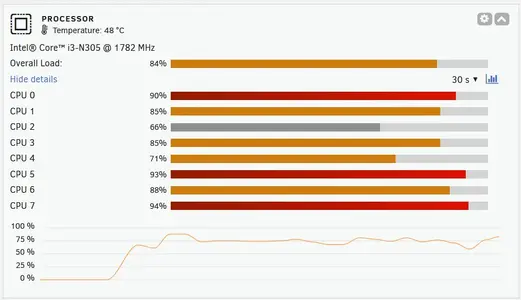
Processor is still hanging in there, but rebuilding during the phase where all drives are engaged (the 4X10TB drives will drop off over night) most certainly gives it a workout.
 
Last edited:
xentr_thread_starter
1750536958137.webp

Not quite as heavy usage as I had during all-drive parity, but scanning a relatively full library for intro skip, and generating trickplay images puts a relatively heavy load on the processor.

I also went through my transcode settings to ensure I was offloading to the iGPU. I had the settings selected, but not sure I had the docker container configured so that it could access the iGPU. (Confirmed it's working now).
 
View attachment 44221

Not quite as heavy usage as I had during all-drive parity, but scanning a relatively full library for intro skip, and generating trickplay images puts a relatively heavy load on the processor.

I also went through my transcode settings to ensure I was offloading to the iGPU. I had the settings selected, but not sure I had the docker container configured so that it could access the iGPU. (Confirmed it's working now).
Thumbnails, intro, etc will not use the gpu in ny experience. It always uses the cpu.
 
xentr_thread_starter
Thumbnails, intro, etc will not use the gpu in ny experience. It always uses the cpu.

Yeah, I'm aware that it's just the transcoding which will make use of the igpu, and in all honesty I don't think there's much transcoding going on. It's all pretty much direct play over my local network.
 
Yeah, I'm aware that it's just the transcoding which will make use of the igpu, and in all honesty I don't think there's much transcoding going on. It's all pretty much direct play over my local network.
Ok, It wasnt very clear to me in your post. I personally wondered why it never used the gpu to create thumbnails as it is going through the transcoding process to do it.
 
Last edited:
xentr_thread_starter
Yeah I ended up looking at both the igpu transcode settings and the two plugins based on a video. The video is how the two are related. :)

Scanning for trickplay (generates images for the position slider) should probably be done earlier rather than later when it comes to the size of a person's library..... 17+ hrs in and I'm still only at 25%. :)
 
Yeah I ended up looking at both the igpu transcode settings and the two plugins based on a video. The video is how the two are related. :)

Scanning for trickplay (generates images for the position slider) should probably be done earlier rather than later when it comes to the size of a person's library..... 17+ hrs in and I'm still only at 25%. :)
I have all of my tasks set to run on a schedule between 2 and 6am. That way it doesnt affect anyone watching my server, well at least its minimal. Even with a 14900k it can cause major buffering when people are watching. Proably because its a spinner issue.
 
Back
Top