xentr_theme_editor

  • Please do not post any links until you have 3 posts as they will automatically be rejected to prevent SPAM. Many words are also blocked due to being used in SPAM Messages. Thanks!

Microsoft announces Windows 10

Installation of Windows 10 takes about 5 minutes on average when done from a USB. Sounds like something is wrong in your particular case.

The MS account is used for various things - it can store your digital entitlement (license) if you did the upgrade from a previous version of Windows making upgrading hardware an easier process - it will integrate into various functions of the OS (Cortana, email app, map app, etc), and the like. Most of the functionality would be more useful on a mobile device using Windows, or if you are using a desktop with a mobile device (phone) in parallel.

It provides me no benefit so I stay with local accounts. If the MS account really does cause problems with booting into safe mode I'd be creating a seperate account with local admin privileges for situations where you may have no choice but to boot into it.
 
...my Alienware 13 R3 has issues now with Windows Hello...
So actually it was due to some changes of the default Group Policy settings. I had to disable the "Use enhanced anti-spoofing when available" rather than leaving it as "Not Configured". It can be found under Computer Configuration > Administrative Templates > Windows Components > Biometrics > Facial Features in case anyone else runs into the problem.

Only really impacts domain-joined machines though I'd imagine.
 
*snip* The Creator update won't allow me to use the older desktop background setting interface to set different backgrounds on two monitors... Why Microsoft?? Why??!! :blarg:

So... I withdraw my comment. They actually added the "Set for monitor..." option in the new UI! Although it certainly wasn't obvious to me that it was an option to right click where you need to.

Right click desktop, select Personalize > Background. Then when you have the picture(s) displayed that you want under "Choose your picture", right click the thumbnail and select the monitor option you want. Each time you browse and select a picture it will rest it for both but then you just right click and chose the option you want again.

Thanks you Microsoft. I stand corrected.
 
Hrmmmm.......

Just noticed that they removed control panel from the Win+X menu. Pretty sneaky........

Not even sure if that was part of the upgrade or if they snuck it in on an update.
 
Hrmmmm.......

Just noticed that they removed control panel from the Win+X menu. Pretty sneaky........

Not even sure if that was part of the upgrade or if they snuck it in on an update.

Didn't we go over this a few pages ago? :whistle:

Anyone who has put 1703 on, can you check something for me. When you right click the start menu, is there still an option for the control panel?

Thanks

No, it's been replaced with powershell as a default. There is apparently a way to switch it back though.

I pin my control panel to my taskbar but that definitely seems like a silly thing to do. Everyone uses the control panel. Maybe 0.1% of people use Powershell.....

It's easy enough to change back. There's a switch in the taskbar settings.
 
Heh... for some reason I thought that was the command prompt, and thus the response I gave is incorrect. The switch is to replace powershell with command prompt not control panel.
 
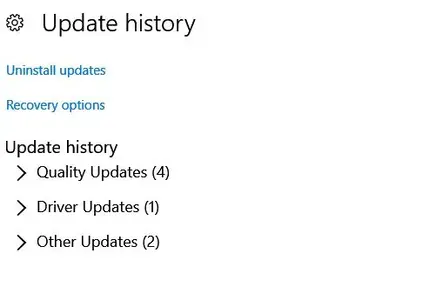
Update History.webp

Not sure what update/upgrade this showed up in, but it's great to see better breakdowns of the types of updates. OTOH, the standard Cumulative Updates that we're getting these days makes it much harder to figure out what part of an update caused issues on your PC.
 
Back
Top