xentr_theme_editor

  • Please do not post any links until you have 3 posts as they will automatically be rejected to prevent SPAM. Many words are also blocked due to being used in SPAM Messages. Thanks!

The woes of EFI boot for windows UEFI

draemn

Well-known member
Joined
Dec 10, 2010
Messages
1,688
Reaction score
50
xentr_thread_starter
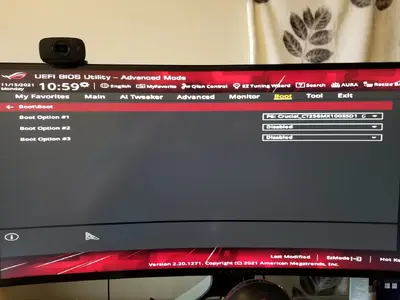
So after installing windows 10 again, I decided to use UEFI boot and "format" the drive for EFI boot. I repeatedly have failed boot attempts where it says the boot manager is missing. Going into the BIOS and toying with the boot settings/priority didn't seem to fix/hold the solution although picking a manual boot override for the boot manager partition of the drive had windows load properly.

I think I finally found the solution (not sure) was to disable EVERY other option I could find for boot devices. Having the other drives/partitions as #2, #3 boot priority, etc seemed to be creating some unknown problem. Will try to remember to update this post later if I either confirm or deny if my computer stops having issues with booting.
 
xentr_thread_starter
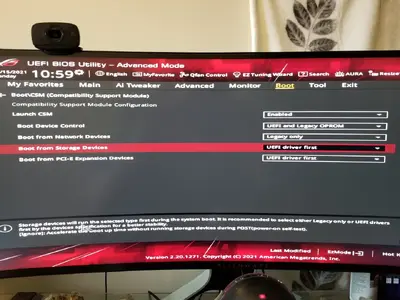
Yes, it's set to UEFI first from what I can tell. I guess disabling CSM will work too, although just removing every other possible boot device already fixed my problem. I don't get why when I had the same boot priority but different devices listed as 2nd/3rd options it would screw up and yet it works when I just disable the 2nd/3rd options.
 
Yes, it's set to UEFI first from what I can tell. I guess disabling CSM will work too, although just removing every other possible boot device already fixed my problem. I don't get why when I had the same boot priority but different devices listed as 2nd/3rd options it would screw up and yet it works when I just disable the 2nd/3rd options.

Perhaps cause you have CSM enabled ?
Try disabling CSM and put the other settings back, maybe a solution as well.

For the current 308x series graphics cards Im hearing nothing but "CSM Disabled", defintely for updating VGA bios / fw.

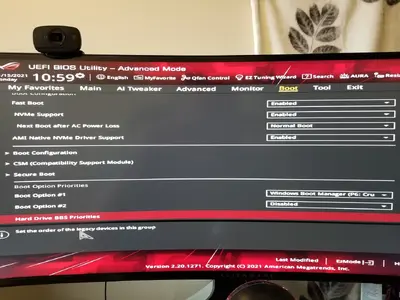
I also have Fast Boot disabled and for boot "Windows / UEFI enabled"
 
xentr_thread_starter
so I still have times where I start the computer and look away and then it just is in the BIOS screen when I look back? Any reason it's booting to BIOS? I went in to disable the CSM and it gave me some warning about PCIe storage devices and I just said "okay" since all my SSD are SATA drives. Then it disabled all of the boot options in the bios for some reason?

Note, when it boots to BIOS I can just exit bios and boot successfully into windows.
 
Last edited:
So it's booting straight to the BIOS screen? If so that's odd, as you usually have to press F1, or some such, to get there (such as recovering from a bad OC.)

This sounds a lot like a SOC P-state issue. In a previous thread you mentioned some system specs, but not the MB.
 
xentr_thread_starter
It's a Asus B450-F board.

Sadly every time it happens I'm looking away from the computer so I'm not 100% sure (it doesn't happen every time) if anything else shows up on the screen or happens, but it's less than 20 seconds from when I press the power button to when I look back and see the BIOS screen.
 
It's a Asus B450-F board.

Sadly every time it happens I'm looking away from the computer so I'm not 100% sure (it doesn't happen every time) if anything else shows up on the screen or happens, but it's less than 20 seconds from when I press the power button to when I look back and see the BIOS screen.
LOL! You're troubleshooting here!...Keep your eyes on the screen.:)

Maybe a read through this might help https://www.bleepingcomputer.com/forums/t/708317/windows-10-wont-boot-off-ssd-after-attaching-hdd/

In my case with an MSI B450 board, I was booting from a single SATA SSD. If I shut down and powered down the drive would dissapear and the boot would hang at the "splash screen" (which varies from board to board.) At the time there didn't seem to be any way to get it back short of sticking removable boot media in. At this point rather than trying to recover, which can be a pain, I re-installed. Immediately installing chipset drivers made the problem go away.

I have an NVME drive to try, but have been having too much fun fiddling with RAM timings to potentially "dive back in to the can of worms". I'm going to get to it soonish' though.

Edit: I enjoy the RAM timings can of worms much more than the Windows/UEFI can of worms for some odd reason.
 
Last edited:

Latest posts

Back
Top