xentr_theme_editor

  • Please do not post any links until you have 3 posts as they will automatically be rejected to prevent SPAM. Many words are also blocked due to being used in SPAM Messages. Thanks!

Is my gpu starting to fail?

icu222much

Well-known member
Joined
Nov 12, 2012
Messages
69
Reaction score
0
xentr_thread_starter
I have a R9 280x. When I am booting Windows I would see the Windows logo. Sometimes I also see a row of colours at the bottom of my primary monitor (see attached photo). In my photo, I see a row of red colour. Last week I saw a row of blue colour. I've only seen this issue twice, and I turn on my computer everyday.

Is this indicating that my gpu is starting to fail? Is there anything I can do to check my video card's health?
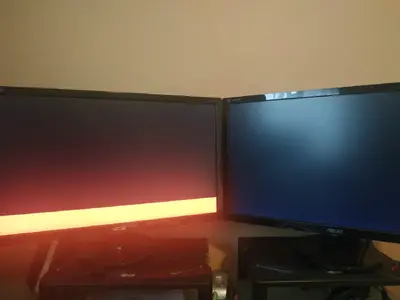
IMG_20211111_104915.webp
 
well it could be it also could be just a glitch, for checking to see if your GPU is failing I mean you can run some furmark and see if you have any artifacts happening might be a sign of things to come it might not tell you anything

hell it could be a problem with your motherboard/slot the GPU is plugged into, have you tried any other card on that pc to see if the same thing happens???, have you tried that GPU on another pc to see if it happens ??? have you check gpu temps ???
 
I believe it could also be an problem with the monitor itself. Try just using your second monitor and see if you have the same result.

Also try bringing up the monitors settings, the on screen display from the monitor itself I mean, and see if that displays correctly, ideally over the erroneous colour area.

If you have the option, try different monitor connections as well, although I don't recall what options you have on an 280x.

Basically you are trying to rule out monitor vs GPU issues as a starting point. If you try with your second monitor there, set up by itself, and you see the same result you can likely rule out a monitor issue and move on to GPU testing as @gingerbee suggested.
 
If you did not crash in windows or saw graphical glitch once windows is loaded, my bet is on the monitor or the cable / adapter used.

As the others said, test using another monitor and some gpu benchmark software.
 
xentr_thread_starter
Things I have tried:
  • I ran furmark for 20 minutes without any issues. My temps reached 68*, with gpu load at 100%, and fan load at 67%.
  • I just swapped monitors and cables in hopes to isolate the problem.
  • I unfortunately don't have another gpu/mobo I can swap.
I only saw the graphical glitch when Windows was loading. I haven't seen it since I last posted this thread.

Any other trouble shooting ideas?
 
Last edited:
change cables it looks like you have two monitors plugged in maybe try one
and like others said run the test stress the card a little if none of that works maybe check the power cables to the card but I doubt that is what it is
 
^^^^ Not sure…have you tried installing in Safe Mode?

I recal a number of years ago whereby for whatever reason I couldnt install GPU Drivers so tried iti n safe mode and worked fine.
 
Last edited:

Latest posts

Back
Top