xentr_theme_editor

  • Please do not post any links until you have 3 posts as they will automatically be rejected to prevent SPAM. Many words are also blocked due to being used in SPAM Messages. Thanks!

UDM Pro

Bell gigabit plan here too. With direct connection using the bell sfp to the USG-PRO, could only manage 600 down, 600 up. With the HH3000 in bridge mode and using a cat6 0.5m cable, down is 950 up is 750.

This is the same behavior I've experienced, I'm using a TP-Link MC220L because I couldn't get direct SFP working and my speeds are down substantially on my UDM Pro.

I can't seem to find a good guide that's helped me get SFP directly into the UDMP to try that out... But considering I'm using all of the threat management stuff I suppose it's not the end of the world.
 
xentr_thread_starter
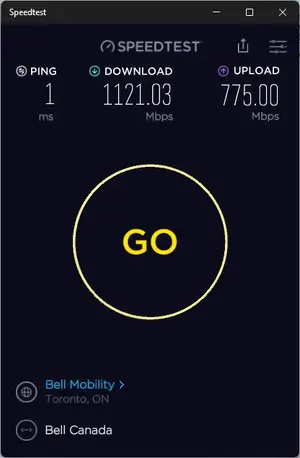
Long awaited but it looks like it's finally a step in the right direction! This is on Bell Fibe 1000/750.

1634099281941.webp
 
xentr_thread_starter
Waiting for this to be RC first. But the second it is…
I've been on the Beta track for as long as I can remember now and haven't had any outages/downtime. Even ran the pulled release where DHCP was broken for some people as I didn't encounter that. Maybe I've just been lucky?

I also run boostchicken/udm-utilities to load fabianishere/udm-iptv container too, so I'm a bit off the "beaten path" as well. That being said, my Bell Fibe TV works great :)
 
I’m tempted, but both girlfriend and I work from home. Can’t risk any downtime. Running 1.10.0 and 6.4.54 quite stable ever since released - except for a memory leak on the udmp. Simple console restart fixes that, without any network loss.

Oh and @zoob , the us-16-xg still runs like a charm.

edit; well, I was tempted this morning. Flawless update to 1.11.0-16, through GUI. 1Gb downloads (and then some, with provisioning), 650 up. We’ll see about the memory leak that my 1.10.0 slightly suffered (rebooted console every 2 weeks).
 
Last edited:

Latest posts

Back
Top