xentr_theme_editor

  • Please do not post any links until you have 3 posts as they will automatically be rejected to prevent SPAM. Many words are also blocked due to being used in SPAM Messages. Thanks!

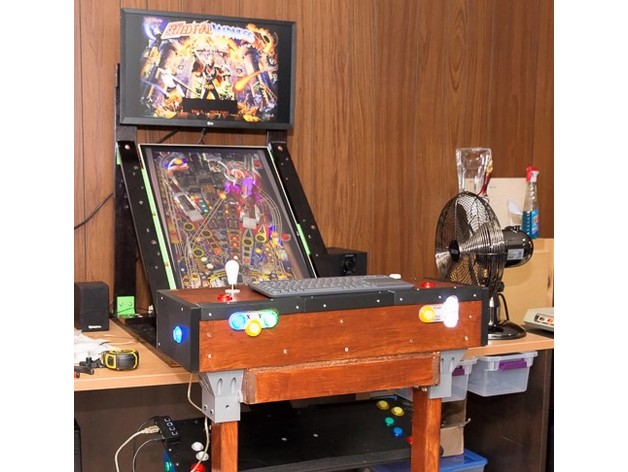
Completed Fixed angle 32" monitor stand (Pinball) & Front full width controller box

xentr_thread_starter
Can you make a cube, use a cylinder as a void on the cube. Then, take that cube with a hole in it and us it as a void to round off the corners?

I've been trying different versions of that, but am running up against tinkercad's limitations... it doesn't do true circles, and when I make interior sphere voids it's coming out flat instead of rounded. I could try to make the edges of the cube with cylinders, but then I'm still stuck with trying to round off the corners. A sphere where I "void out" the sides might work but trying to get the measurements correct would be a pain. (Part of the limitations of tinkercad is that the only measurements you can see are the full external dimensions).
 
xentr_thread_starter
All I need is a 40 X 40 X 22mm (high) box that I'm going to "void out" 18 mm height over the whole surface (so 4mm walls). I only need the mating edges rounded.

Not even completely sure if this will work, and maybe it's the kind of thing I need to push me into fusion.... :)
 
What you're talking about is filleting the corners, and it's very easy to do in Fusion 360. Press F, select the line(s), and set the radius of the fillet.
 
xentr_thread_starter
What you're talking about is filleting the corners, and it's very easy to do in Fusion 360. Press F, select the line(s), and set the radius of the fillet.

Yeah, I kinda figured it was probably easy to do in fusion.... I'll have to take a fit and open fusion up. :)

edit: Maybe I'll make up the basic "cube" in tinkercad and then import it to fusion.

edit2: I managed to create a 40X40X40 cube and then filleted the whole thing so that I could export it as an STL and then imported that STL into tinkercad so that I could apply a "void" to hollow it out. I'm going to print it off to see how we do, but I won't be surprised if tinkercad fubars the rounded portions...

I really have to take the time to do some instructional videos.... fusion most certainly still isn't "intuitive" based on my experience with tinkercad.
 
Last edited:
xentr_thread_starter
palm trim.webp

Not perfect, but it is better. I'm going to go back into fusion and see if a wider radius will work, but I suspect there's only so much radius that can be applied without having it protrude an inch from the side of the cabinet.
 
xentr_thread_starter

Not sure if anybody is interested, but here's the trim I used on the controller cabinet.

edit: Oh, and I've got to keep reminding myself that physically nudging the front of the controller isn't going to do anything to the ball..... :)
 
Last edited:
xentr_thread_starter
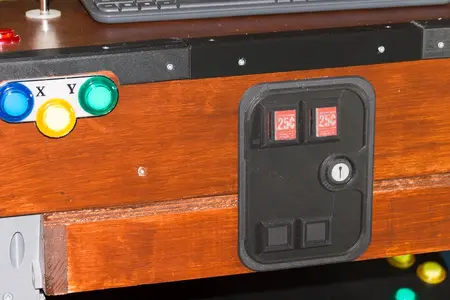
Just when we thought it was all over....... ;)

Coin Door installed.webp

Happy with how that turned out, but it's been attached using gel tape and while I'd like to move it up a bit I'm afraid it'll rip off the finish.... :)
 
xentr_thread_starter
Mame Buttons top.webp

Mame Buttons Modes.webp

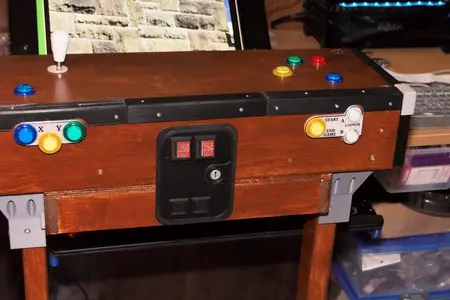
Slow day around here so couple of pics of the latest mod.

Added 3 more buttons up top for MAME and a couple tucked inside the body for the modes (turbo and auto fire). Works pretty damn fine for vertical shooters. :)
 

Latest posts

Back
Top